 Water Eject
Free iPhone utility
Water Eject App for iPhone Speakers
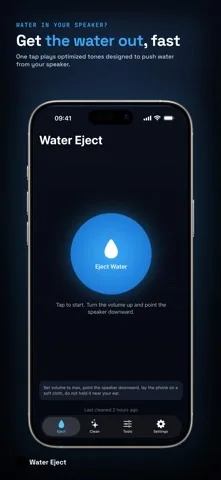
Sound gone dull after a splash? Water Eject plays a pulsed low frequency tone through your speaker, the same idea the Apple Watch uses to clear its own. One tap, about eleven seconds, and nothing leaves your phone.

Free. iPhone, iOS 17 or later. No account, no sign up.
- Free download
- Runs on device
- No sign up
- iPhone only
- Version 1.1.0
What you get
The exact tones it plays
Most speaker cleaning pages will not tell you what comes out of the speaker. Here is the whole list, read straight from the app.
| Program | Frequency | Shape | Length | Tier |
|---|---|---|---|---|
| Water Eject | 150 to 220 Hz | Pulsed, 700 ms on, 300 ms off, 2.5 sweeps | 11 s | Free |
| Deep Clean | 2.2 kHz | Steady tone | 15 s | Free |
| Speaker Test | 660 Hz | Steady, one side only | 1.3 s | Free |
| Resonance Sweep | 100 to 500 Hz | Continuous, 4 sweeps | 12 s | Pro |
| Deep Pulse | 150 to 200 Hz | Staccato, 250 ms on, 150 ms off | 15 s | Pro |
| Full Clean Sweep | 200 Hz to 8 kHz | One rising sweep | 14 s | Pro |
| Noise Burst | around 1.5 kHz | Filtered noise, 1.5 s on, 1 s off | 12 s | Pro |
| Tone Generator | 100 Hz to 16 kHz | Any frequency you set, in 10 Hz steps | 8 s | Pro |
Four tools, all free
Water Eject
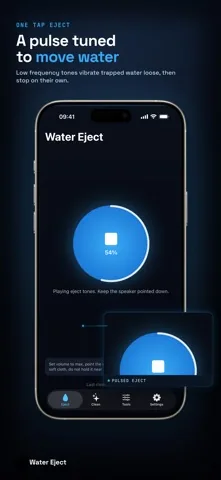
150 to 220 Hz, pulsedThe wet phone tool. Bursts of low tone with silence between them, so each burst starts from rest and hits the membrane harder than a continuous tone would.
Deep Clean
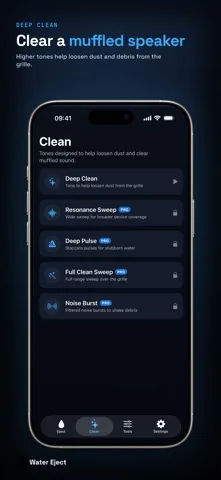
2.2 kHz, steadyThe dry phone tool. A held tone meant to help work dust and pocket lint out of the grille after the water is gone. Use it when the sound is dull but the phone never got wet.
Speaker Test
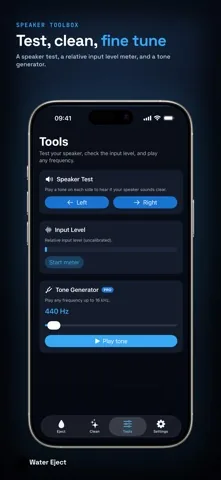
660 Hz, left then rightA short tone sent to one side at a time, so you can hear whether one channel is quiet, rattling or silent before you blame the water.
Input Level
Relative, uncalibratedA live bar driven by the microphone. It shows relative level, not decibels, and it is useful for a rough before and after comparison. The microphone runs only while the meter is open.
How to use it
Take the case off and dry the outside
A case lip over the speaker holes traps whatever comes out. Wipe the phone with a lint free cloth first.
Turn the volume up
The tone has to move the membrane. At a low volume it will not do much. If you push past about 85 percent the app shortens the run by itself to protect the speaker.
Lay the phone flat, speaker down
On a soft dry cloth, so gravity works with the tone and the droplets land somewhere absorbent.
Tap Eject Water
About eleven seconds. The ring fills as the run proceeds. Do not hold the phone against your ear.
Listen, then repeat or move on
Play a voice memo or a song. Still dull? Run it again, wait for the short cool down, then try Deep Clean for dust. The app notes when you last ran it, on the device.
Get the app
Free, no account, no sign up. Works on iPhone with iOS 17 or later.
Water Eject Pro is optional: 2.99 USD once, no subscription.
Where a tone helps, and where it does not
A tone can only move liquid that is sitting in or just behind the speaker grille. It does nothing for liquid that has reached the logic board, the camera or the charging port.
Worth trying: muffled or crackly sound after a splash, a rainy walk, a shower, a sink or a short drop into fresh water, when the phone otherwise behaves normally.
Not the right tool: a phone that was under water for a while, sea water or a sugary drink, a screen with lines or spots, a phone that will not charge, or a device already showing the liquid detection alert on its charging port. Those need drying time and, often, a technician.
Safety the app enforces: no run may pass 20 seconds. Above 2 kHz the level drops, and it drops further at 8 kHz and above. Between repeated runs there is a forced pause of 3 to 30 seconds. If iOS reports a serious thermal state, the app refuses to start until the phone cools. A phone call interrupts and stops the tone.
Water Eject Pro
One purchase, 2.99 USD in the United States, no subscription. It is optional and the core tools stay free without it.
- Four more tone programs: Resonance Sweep, Deep Pulse, Full Clean Sweep and Noise Burst.
- The tone generator, any frequency from 100 Hz to 16 kHz in 10 Hz steps.
- No ads and no banner.
Useful mainly if the standard 150 Hz to 220 Hz burst did not clear your particular phone. Different speaker assemblies respond at different frequencies, which is what the wider sweeps are for.
What the app does with your data
Nothing leaves the phone. There is no account and no sign up. The input level meter asks for microphone access the first time you start it, uses it while the meter is on screen, and never records or transmits anything. The time of your last run is stored on the device only. The free version shows ads through Google AdMob, which may use an advertising identifier. Full detail is in the privacy policy.
Frequently asked questions
How do I get water out of my iPhone speaker with Water Eject?
Take the case off, dry the outside of the phone, turn the volume up, lay the phone flat with the speaker facing down, and tap Eject Water. The app plays a pulsed tone that slides between 150 Hz and 220 Hz for about eleven seconds. Listen afterwards. If the sound is still dull, run it again, then follow with Deep Clean.
Does Water Eject actually work?
It works the way the Apple Watch clears its own speaker: a low tone drives the speaker membrane hard enough to break the surface tension holding droplets against the grille, so they fall out. That often restores muffled sound after a splash. It cannot help with liquid that has reached the inside of the phone, and it is not a repair. Results vary with how much moisture is present and with the condition of your device.
Is Water Eject free?
Yes. The download is free, and the four core tools are free to use: Water Eject, Deep Clean, Speaker Test and the input level meter. The free version shows ads. Water Eject Pro is an optional one time purchase, 2.99 USD in the United States, that removes the ads and unlocks four more tone programs plus the tone generator.
Is it safe to play these tones through my iPhone speaker?
The app plays ordinary audio, and it holds itself back on purpose. No single run may exceed 20 seconds. If the system volume is above about 85 percent, a low frequency run is cut to 8 seconds. Above 2 kHz the level is reduced, and reduced further at 8 kHz and above. If iOS reports that the phone is running hot, the app refuses to start and waits. Keep the phone away from your ear during the higher frequency modes.
What is the difference between Water Eject and Deep Clean?
Water Eject is the wet phone tool: a pulsed 150 Hz to 220 Hz tone meant to shake droplets loose. Deep Clean is the dry one: a steady tone at 2.2 kHz, held for about fifteen seconds, meant to help loosen dust and lint in the grille. Water first, dust second.
What does Water Eject Pro include?
Four more tone programs and the tone generator. Resonance Sweep covers 100 Hz to 500 Hz in four passes for phones whose speaker responds at a different frequency. Deep Pulse is a harder staccato, 250 milliseconds on and 150 off. Full Clean Sweep runs 200 Hz up to 8 kHz. Noise Burst plays filtered noise around 1.5 kHz in bursts. The tone generator plays any frequency from 100 Hz to 16 kHz. Pro also removes the ads.
Does the app record audio or collect my data?
No. Everything runs on the phone, with no account and no sign up. The input level meter turns the microphone on only while that meter is open, reads a level from it, and shows a bar. Nothing is recorded, stored or sent. The free version shows ads through Google AdMob, which may use an advertising identifier.
Try it on your phone
It takes about eleven seconds to find out whether the sound comes back.
Free on the App Store.
Guides
- How to get water out of an iPhone speakerThe five step routine, and the four things that make it worse.
- iPhone speaker sounds muffledWater, dust, a setting or real damage. Tell them apart before you fix anything.
- Clean dust out of the speaker grilleSound first, then a soft brush and tape. What never to put in the holes.
- iPhone speaker test, one side at a timeA 660 Hz tone on the left, then the right, and how to read the result.
- Your iPhone got wetThe first hour, in Apple's order. No rice, no hair dryer, no charging.
- Water Eject shortcut or appAn honest comparison. Sometimes the free shortcut is the right answer.
- Does the iPhone have water eject?The Apple Watch clears its own speaker. The iPhone does not. Here is why.
Water Eject: Sound Cleaner
A small sound utility for iPhone. It plays a pulsed low frequency tone designed to help push trapped water out of the speaker, higher tones meant to help loosen dust, a per side speaker test and an on device input level meter. Free, iOS 17 or later, no account.
Version 1.1.0. Utilities.